Muttator
Muttator
Muttator is a free add-on for the Thunderbird mail client, which makes it look and behave like the Vim text editor. It has similar key bindings and you could call it a modal mail client, as key bindings differ according to which mode you are in. For example, the same key can select the next message while the message list has focus or can scroll down an existing message when the message preview is selected. It also adds commands for accessing most Thunderbird functionality - e.g. :contact -firstname Martin -lastname Stubenschrott stubenschrott@vimperator.org will add a new contact with my details.
But Muttator is more than just a simple command interface to Thunderbird — it is a complete development environment as well. If you are a web developer, you can enjoy an interactive JavaScript shell — even with completion support. Or if you want to extend Muttator, you can easily do that by just dropping a JavaScript file in its plugin directory. Browse through our wiki pages for nice tips to customize Vimperator and for frequently asked questions. If you have more questions, you can visit us on IRC, in #vimperator on freenode.
Credits
Muttator was initially written by Martin Stubenschrott and has found many invaluable contributers who helped out fixing bugs and adding new features.
If you appreciate the work on Muttator and want to encourage us working on it more, you can send us greetings, patches, or donations:


If you rather prefer getting some nice products for your money, you can also support us by buying some cool merchandise like t-shirts or mugs. Of course, as we believe in free, open source software, only support us financially if you really like Vimperator and the money doesn’t hurt — otherwise just use it, recommend it and like it :)
Download
Downloads are hosted on the official Firefox Add-ons repository at addons.mozilla.org, where you can always find the latest version:
Release Notes | Other Versions | Source Code
Features
- Vim-like key bindings (
h,j,k,l,gg,G,0,$,ZZ,<C-f>, etc.) - Ex commands (
:quit,:goto Inbox, …) with a proper command line - Tab completion available for all commands, showing suggestions while you type
- Hint mode (start with
fto follow a link) - Extensions! Yes, you can extend Muttator’s functionality with scripts just like you can extend Firefox or Thunderbird with extensions
- Explore JavaScript objects with
:echo windowand even context-sensitive tab completion - Easily customizable GUI (easily hide all GUI elements with
:set gui=) - Ability to
:sourceJavaScript files, and to use a~/.muttatorrcfile - Count supported for many commands (
3giwill open the third inbox) - Beep on errors
:mapand:commandsupport (andfeedkeys()for script writers).:timesupport for profiling- Move the text cursor and select text with Vim keys and a visual mode
- External editor support
- Macros to replay key strokes
- AutoCommands to execute action on certain events
- Many other Vimperator features are available when in
-- MESSAGE --mode - A partial
:helpsystem, explaining some commands, mappings and options - Much more…
Screenshots
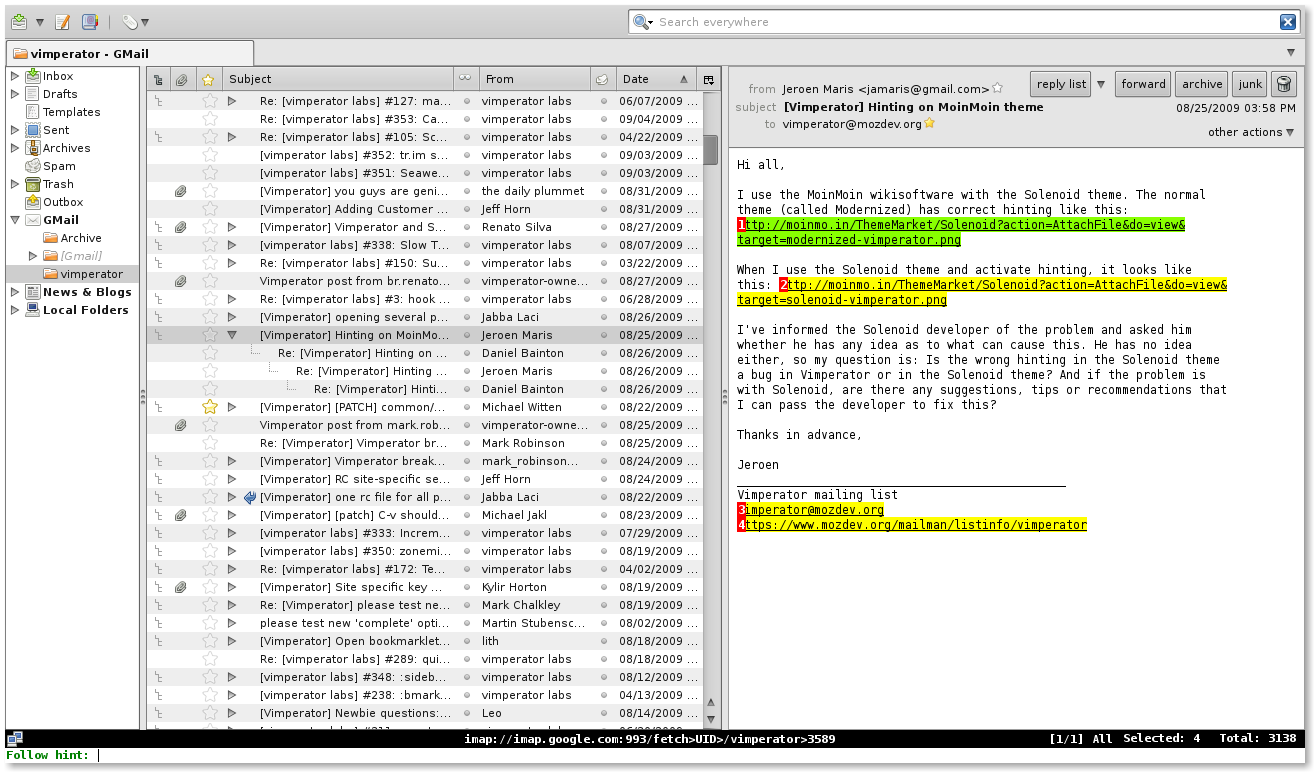 Muttator showing the same type of Hints to follow links with the keyboard as Vimperator
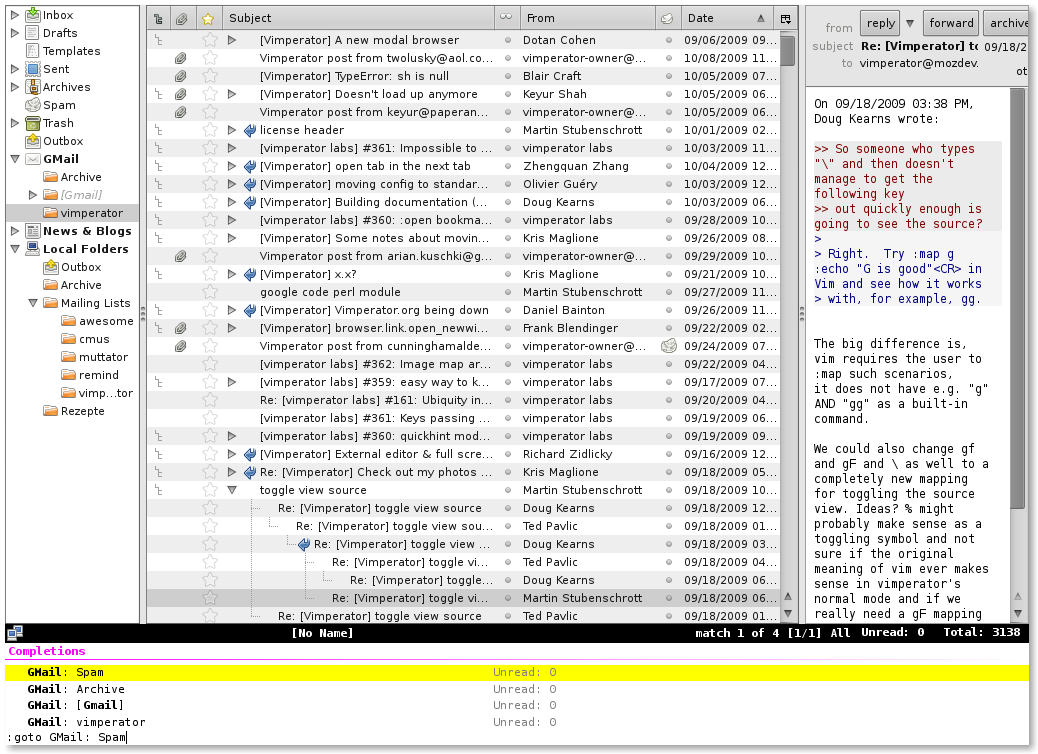 Muttator’s completion system
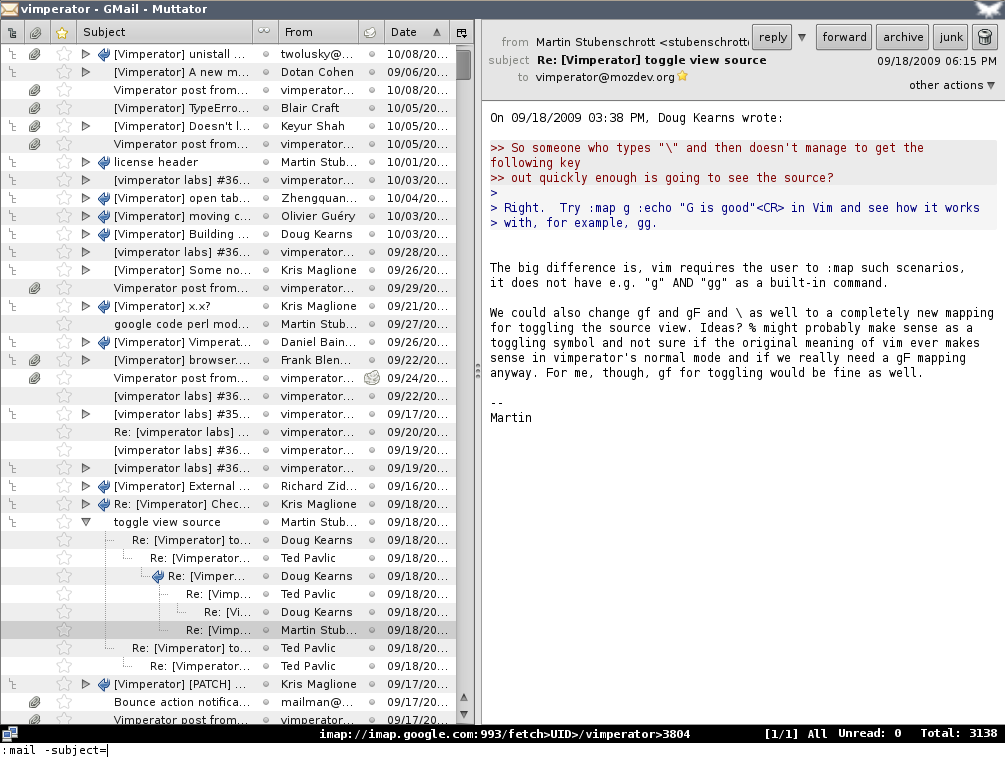 Most chrome can be hidden in Muttator to give the messages more room
Scripts
While Muttator offers already lots of cool features, we cannot and don’t want to include every feature directly in the core. Therefore you can enhance the Muttator experience by adding plugins which add new commands or mappings. Install these plugins by copying them to the ~/.muttator/plugin/ directory (or %HOME%\muttator\plugin on Windows) unless noted differently.
If you don’t care about features but just use Muttator for the sexy looks, you can also theme that by using color schemes. You can install them by copying them to the ~/.muttator/colors/ directory (%HOME%\muttator\colors on Windows) and use it with :colorscheme <name>.
Bugs
Unexpected features - sometimes also called bugs - are listed in our issue tracker. You can also file feature requests there.